

You've finished a long day on the tools, your phone's full of missed calls, and the last thing you want to do is sit down and write another post about the job you just wrapped. That's the gap AI content creation tools can fill for a trade business. They're not there to replace trade knowledge, they're there to take the admin-heavy writing off your plate so you can stay visible while still getting paid for real work.
Table of Contents
- What Are AI Content Creation Tools Anyway
- How These AI Tools Actually Work for a Trade Business
- The Real Benefits and Limitations for Tradies
- Putting AI to Work Practical Examples and Prompts
- How to Choose the Right AI Tool for Your Trade
- Making AI a Smart Part of Your Business
What Are AI Content Creation Tools Anyway
A lot of tradies hear “AI” and think it means another tech headache. In practice, these tools are closer to a digital apprentice for your marketing work. You still decide what matters, but the tool can help write the post, shape the message, and keep the online side moving when you're flat out on site.
A bloke might finish a boiler replacement at 5:30, jump in the van, and realise he hasn't posted in two weeks. That's where AI content creation tools help. They can draft a service update, turn a jobsite photo into a caption, or give you a few post ideas for the week without you staring at a blank screen.
The market is moving fast too. The global AI-powered content creation market was estimated at USD 2.15 billion in 2024 and is projected to reach USD 10.59 billion by 2033, with a 19.4% CAGR from 2025 to 2033, according to Grand View Research. That doesn't matter because of hype. It matters because these tools are becoming normal business equipment, not a novelty.
Practical rule: if a tool saves time but creates generic rubbish, it's not helping your trade business.
For local businesses, value is simple. You don't need to become a writer. You need a steady way to explain what you do, show recent jobs, and remind local customers that you're available when they need help.
How These AI Tools Actually Work for a Trade Business
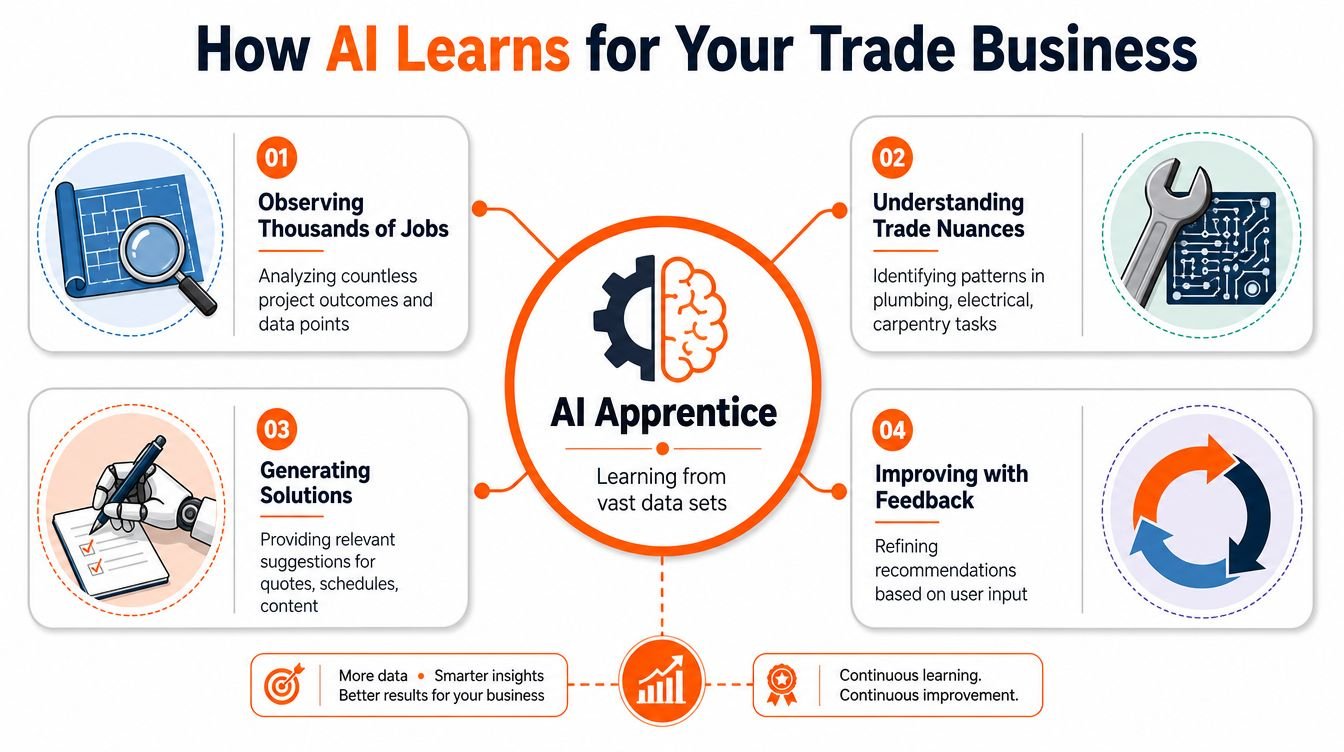
These tools work by analysing large sets of text to spot patterns in effective content, then using that pattern recognition to draft something from the prompt you give it. In a trade business, that means the tool can pick up on the details that make a post useful, like the job type, the service area, the problem solved, and the tone that suits a local customer. It is not reading your mind, and it is not replacing trade knowledge. It is assembling a first draft from examples it has learned from.
Generation is only one part of the job
A basic text generator can write a post about a panel upgrade, a new tap installation, or a carpentry repair. That helps, but it only covers the writing step. The bigger time savings usually come when the tool also handles the handoff between idea, draft, design, and publishing, because the work stays in one flow instead of getting passed between separate tasks, as noted by Buffer's guide to AI social media content creation.
That is the difference between asking for a paragraph and setting up a content process. One tool gives you copy. A workflow tool can move that copy into a post, pair it with a visual, and line it up for publishing.
Different tools solve different bottlenecks
Some tools are built for drafting. Others are better at repurposing a completed job into a few versions for different channels. Some focus on scheduling, captions, or bulk production. A trade business does not need every feature under the sun, but it does need the right mix for the way the work happens.
AI works best when it cuts the stops between jobs, not when it only speeds up the first draft.
That is why the useful question is not whether it can write. It is whether it can help you move from finished job to posted update without turning that into another evening admin task.
The Real Benefits and Limitations for Tradies
For a local trade business, the main benefit is consistency. If you're on roofs, under sinks, in roofs spaces, or wiring panels all week, your marketing tends to go quiet. AI gives you a way to keep posting even when the jobs are piling up, which helps you stay in front of local customers instead of disappearing between quotes.

Benefits that matter on a real job schedule
A good AI workflow can help with the stuff that usually gets pushed to the bottom of the list. It can draft a service explanation, turn a completed job into a short update, or help you keep a steady rhythm of local posts without starting from scratch each time. That's useful when you want more enquiries, not more screen time.
It also helps with the common “blank page” problem. Many tradies know exactly what happened on a job, but not how to turn it into something readable. AI gives you a starting point, then you add the trade detail, local context, and proof that the work was done right.
The limits you can't ignore
The downside is just as important. AI tools are strong at synthesising information, but weak at original practitioner judgment. For accuracy-sensitive content in the trades, human validation is a required control step to make sure technical claims and service descriptions are correct, which protects business credibility, according to IOD's guidance on AI writing tools and human expertise.
That means you shouldn't let it guess about technical issues, service scope, or what happened on a specific job. If a post mentions a procedure, a material choice, or a local service recommendation, you need to check it yourself before publishing. The best use is AI-assisted, expert-reviewed, not AI-only.
Bottom line: AI can save time, but it can't tell the truth about your jobsite unless you do that part.
The strongest results come when the tool handles the repetitive writing and you handle the trade knowledge. That balance keeps the content fast, credible, and tied to real work.
Putting AI to Work Practical Examples and Prompts
The easiest way to use these tools is to start with one service and one recent job. Don't ask for a “great post” and hope for the best. Give the tool the job type, the customer problem, the result, and the local angle, then tell it how you want the post to sound.

Copy-and-paste prompts that work
For a plumber, try this:
“Write a short social post about a recent bathroom tap replacement in [suburb]. Keep it practical, friendly, and local. Mention the original issue, the fix, and why a homeowner should get leaks checked early. Do not make up any facts.”
For an electrician:
“Create a Facebook post about a completed switchboard upgrade for a local home. Explain the benefit in plain English, keep the tone trustworthy, and make it relevant to homeowners in [area]. Include a brief safety-minded takeaway.”
For a carpenter:
“Write a post about a custom shelving job finished this week in [town]. Focus on the problem solved, the craftsmanship, and how the result improved the space. Keep it simple, local, and professional.”
These prompts work because they force the tool to stay close to the specific task. You're giving it the shape of the story instead of asking it to invent one. If you want more structure, a few teams also use a workflow like the one explained in this social media automation guide for tradies.
Make the output credible
The strongest AI content for service businesses still needs human details that make it believable and local. Jasper's guidance on AI content creation says the heavy lifting can be drafted and scheduled by AI, but a human expert has to add the details that build trust and local authority, and that's the part that matters most for trade businesses (Jasper).
That means adding street-level context, service specifics, and the kind of wording a local customer understands. A generic post says “quality workmanship.” A better one says what was fixed, why it mattered, and why someone in the area should care.
For more prompt ideas and examples, the free template collection at GrowTradie's AI content creation resources can give you a better starting point than blank-page guessing.
If you can explain the job to a customer, you can usually turn that explanation into a useful post.
A simple routine that saves time
The best results come from batching the work. Write down three jobs, five services, and a few common customer questions, then feed them into the tool in one sitting. That's far easier than trying to invent content from scratch every time you're between quotes.
How to Choose the Right AI Tool for Your Trade
The right tool for a trade business is the one that gets used after a long day. Flashy demos do not matter much if the setup feels clunky, the prompts are confusing, or the output still needs a lot of rewriting before it is good enough to post.
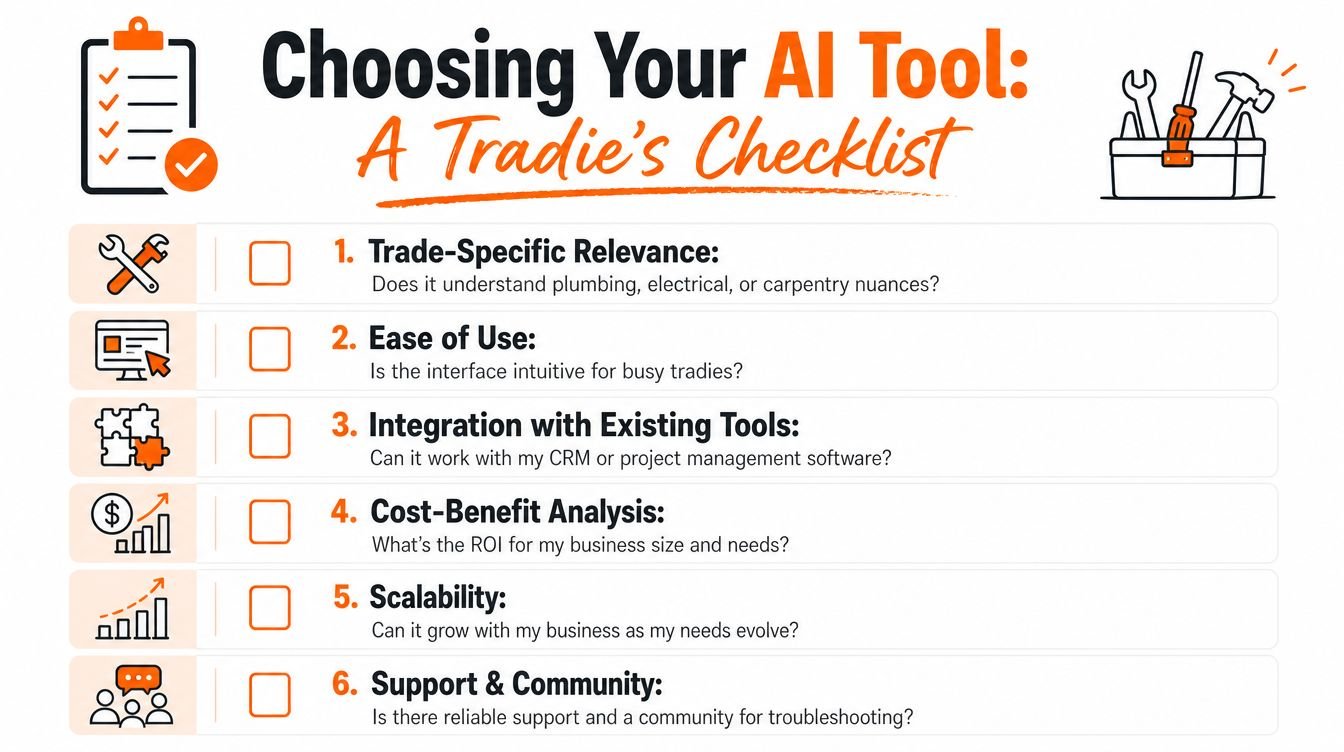
A good first filter is simple. Does the tool help you write about the work you do, or does it keep drifting into generic marketing language? If you can use it on a phone between jobs, keep the output tied to real services, and move from draft to post without much admin, it has a better chance of fitting into a busy trade business.
What to check before you commit
Use a simple filter:
- Trade-specific relevance. Does it understand plumbing, electrical, HVAC, or carpentry language, or does everything sound like generic marketing copy?
- Ease of use. Can you get a post out from your phone between jobs, or do you need a laptop and a spare hour?
- Integration with posting. Does it only write text, or does it help move content toward scheduling and publishing?
- Support for consistency. Can it help you keep posts moving when work gets busy?
- Fit for your business size. A solo operator and a multi-crew contractor don't need the same setup.
If you want a low-cost way to test a few options first, start with free AI content creation tools and templates. That gives you a practical way to compare output before you spend time or money on a paid system.
Integrated workflows matter more than one-off writing
Adobe Creators' Toolkit research found that 86% of creators actively use generative AI, and 60% use multiple AI tools, which shows how common it is to split the work across different steps (Adobe Creators' Toolkit research). For a trade business, that matters because the job is rarely just writing. You may need a caption, a photo caption, a service explanation, and then a way to get it scheduled without adding more admin to your day.
That is why more practical setups handle more than one part of the process. A tool that only writes text can still leave you doing the rest by hand, which cuts into the time you were trying to save in the first place. A better setup reduces friction from the draft stage through to publishing.
Start with one clear test. Ask whether the tool can help you publish one straight-to-the-point post about one real service in one local area. If it cannot do that cleanly, it probably will not save much time in day-to-day use.
Making AI a Smart Part of Your Business
The right way to think about AI content creation tools is simple. They're power tools, not replacements for the person using them. A skilled tradie still has to know the job, spot mistakes, and decide what good work looks like.
For local businesses, the goal isn't to become a content creator. It's to stay visible, build trust, and keep the phone ringing without sacrificing billable hours. A practical first step is to batch three posts around one service you already know well, then review how much time that saves and how usable the output feels. If you want a better way to plan that workflow, this guide to content batching for tradies is a useful next read.
GrowTradie helps trade businesses turn job details, services, and local knowledge into steady social content without the daily grind of writing and posting. If you want your profiles to stay active while you stay on the tools, visit GrowTradie and see how it fits your business.