

You've just wrapped a job, the gear's packed, and your phone's full of photos you never posted. That's the spot most tradies sit in, not because they don't have content, but because turning a real job into a useful post feels like another job after the job. The good news is that how to post on social media for a trade business isn't about becoming a marketer, it's about building a simple habit around the work you're already doing.
Table of Contents
- Why Consistent Posting Matters for Trade Businesses
- Quick Content Ideas and Job-Site Photos That Work
- Writing Short Captions That Drive Local Enquiries
- Platform-Specific Posting Steps for Facebook Instagram and TikTok
- Scheduling and Auto-Posting to Stay Visible Between Jobs
- Local Targeting and Measuring Results That Lead to Jobs
Why Consistent Posting Matters for Trade Businesses
A lot of trade work still comes from word of mouth, repeat customers, and the odd online enquiry. That mix can keep the phone ringing, but it is patchy, and patchy is a pain when you have crews to keep moving and gaps in the diary to fill. A steady social presence gives locals something to remember when the next leak, upgrade, or repair lands on their doorstep.
The shift is that social platforms now show performance data inside the app, so every post can be judged on reach, engagement, clicks, and conversions, not just whether it went out. For tradies, that means social media is not a side hobby. It is a short-cycle habit, and the posts that matter are the ones that keep showing up while the jobs keep moving.
Practical rule: if your posts do not show up regularly, people forget you between jobs.
Consistency beats perfection
I have seen tradies hold back because the photo was not polished or the caption was not clever enough. That usually means nothing gets posted, and the business goes quiet online even when the vans are busy on-site. Consistency matters more than perfect design because locals need repeated reminders that you are active, reliable, and still taking work.
The smarter way to think about posting is as a repeatable business process. Set a rhythm you can stick to, then check what is getting attention and adjust from there. That is the same logic that keeps a good tradie business running, check, adjust, and keep moving.
For local service businesses, steady posting matters because most customers do not need to be dazzled. They need to trust that you are active in their area, that your work looks solid, and that you will answer when they reach out. A clean, regular feed does that better than a burst of random posts followed by silence.
When you are short on time, the job site itself becomes the content plan. A quick photo of the finished work, a short clip of a fix in progress, or a simple behind-the-scenes update from the van gives people proof that the business is out there working. If you want a practical way to turn those everyday moments into posts without wasting half the day on marketing, behind-the-scenes content ideas for tradies are a good place to start.
Quick Content Ideas and Job-Site Photos That Work

Most tradies don't need more ideas, they need a faster way to capture the ones already in front of them. A job site gives you a constant stream of usable content if you learn to notice the moments that show the problem, the fix, and the result. That's where the post comes from, not from sitting at a desk trying to invent one.
Build a small repeatable content library
Start with the shots that tell a complete story. A before-and-after pair works because it proves the job changed something real. A close-up of a finished install, a neat switchboard, a straight run of cabinetry, or a clean tile line shows workmanship without needing a long explanation.
A few other reliable options:
- Problem-solving clips: show the issue, then a quick fix or final result.
- Tool detail shots: a tidy tool setup, a specialist bit, or the gear that makes the job smoother.
- Team photos: a crew shot at the end of a project adds a human face to the business.
- Customer comments: a short testimonial on-screen or in the caption can carry real weight.
A phone photo beats a missed post every time, as long as the job is clear and the image is usable.
The main thing is to shoot in good light and keep the frame tidy. Stand where the work is easiest to read, avoid clutter in the background, and take the shot straight on when you can. The University of Victoria's social media guide says a post needs at least one horizontal photo, and the caption should stay to one or two sentences while still covering what matters (University of Victoria social media post guide).
Keep it fast and natural on site
You don't need a studio setup. A 30-second clip of a fixed leak, a fresh install, or a finished upgrade can be more convincing than a polished ad because it shows the work in motion. For more behind-the-scenes ideas, I'd point you to this practical job-site content guide, especially if you're trying to turn everyday work into posts without overthinking it.
Captions should match the image. If the photo shows a neat bathroom fit-out, the caption should say what was done, where the benefit is, and why it matters to the customer. If the video shows a repair in progress, say what the problem was and what outcome the customer gets from the fix.
The best content is ordinary in the right way. It looks like real work, because it is real work, and that's exactly what locals trust.
Writing Short Captions That Drive Local Enquiries
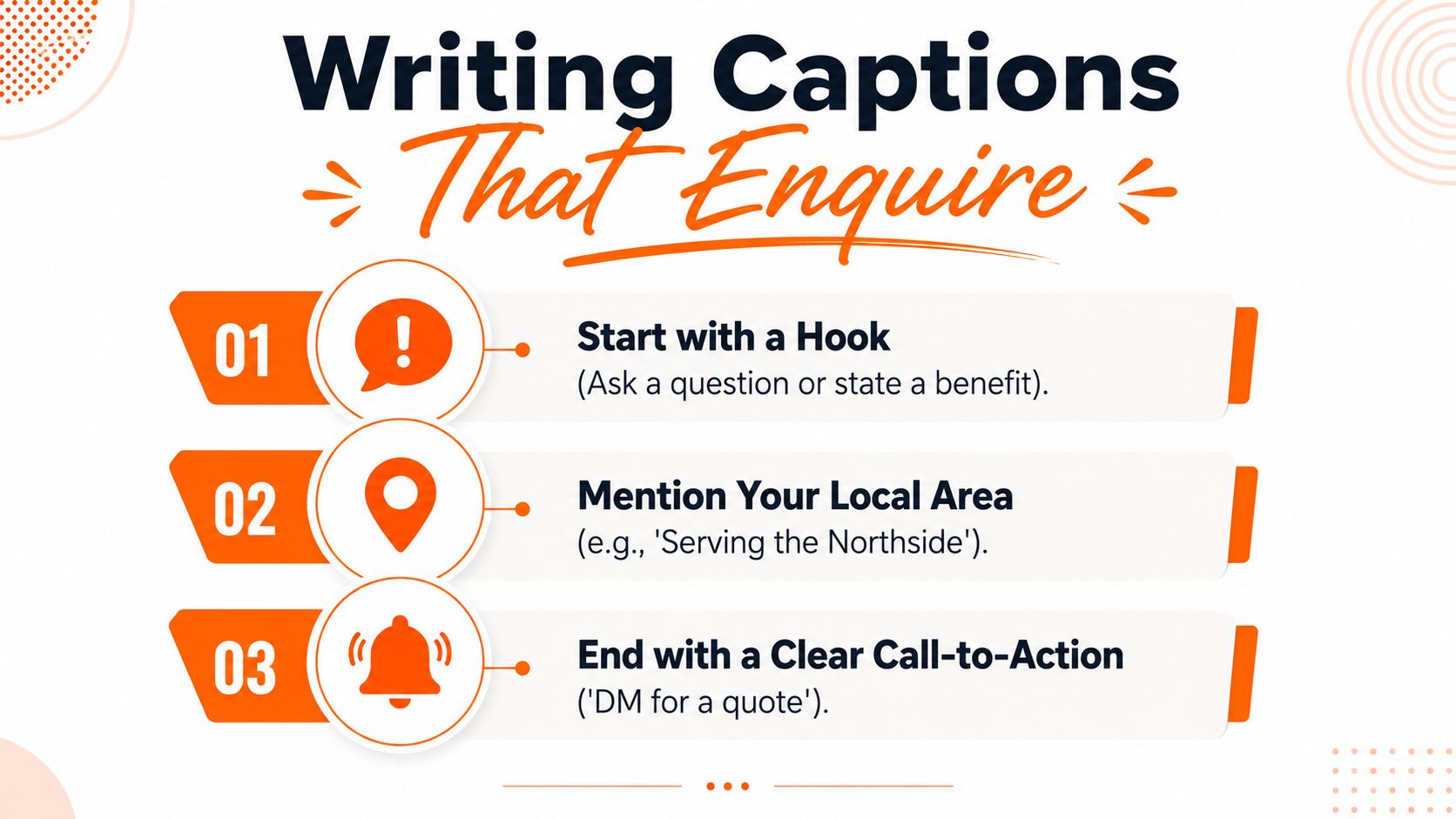
A trade caption doesn't need to sound polished. It needs to be clear enough that someone scrolling on their phone can tell what you do, where you do it, and what to do next. If the caption reads like a brochure, people skip it. If it reads like a normal person wrote it after a day on the tools, it usually lands better.
Use a simple structure that respects attention
The easiest caption structure is short and direct. Start with the result or the problem, add one line of context, then finish with a plain call to action. That keeps the message tight and avoids the wall-of-text mistake that turns a decent post into something nobody reads.
A weak caption sounds like this, “Another job done today, happy customer, give us a call for all your needs.” It says nothing useful. A stronger version sounds more like, “Leaking laundry tap replaced today in Bayside. Clean fix, no more drip, and the customer can use the space again without the mess. Need a local plumber, send us a message.”
The University of Victoria guide also advises avoiding acronyms and keeping the important information front and centre (University of Victoria social media post guide). That matters on social media because people scan faster than they read.
Make the post feel local and useful
Local references work when they're natural. Mention the suburb, the kind of property, or a common issue in the area if it fits the job. A post about hot-water repairs in a coastal suburb, or storm damage work after rough weather, feels more relevant than a generic caption that could belong to any business anywhere.
Avoid sounding too salesy. LegalVision recommends a 30:70 ratio of promotional to non-promotional content so the account doesn't read as purely sales-driven (LegalVision social media post guidance). That doesn't mean you can't ask for enquiries. It means the feed works better when helpful, work-based posts carry most of the load.
For people who want help drafting captions faster, this AI content creation guide is worth a look. The point is not fancy wording, it's getting a clear, local, usable caption onto the post before you move on to the next job.
Platform-Specific Posting Steps for Facebook Instagram and TikTok
Different platforms reward different habits, and tradies waste time when they post the same way everywhere. Facebook is still strong for local reach and community visibility, Instagram is better for clean visual proof and location cues, and TikTok works best when the work itself is the hook. The job is to match the format to the platform instead of forcing one post to do everything.
| Platform | Posts Per Week | Best Formats for Tradies |
|---|---|---|
| 1–2 posts per day | Job photos, before-and-after posts, community updates, local group sharing | |
| 3–5 posts per week | Clean photo posts, Reels, Stories, location tags | |
| TikTok | 2–5 posts per week | Short fix clips, fast before-and-after videos, on-site walkthroughs |
Buffer's frequency guide says the suggested cadence is 1–2 posts per day on Facebook, 3–5 posts per week on Instagram, and 2–5 posts per week on TikTok (Buffer frequency guide). Buffer also points to a HubSpot study of over 13,500 Facebook users showing 1 to 2 posts a day is the ideal frequency for Facebook, while the same guide says LinkedIn tends to improve when brands move from 1 post to 2–5 posts per week. For trade businesses, the lesson is simple, too little posting starves visibility, but stuffing the feed can backfire.
Facebook still suits local trust building
Facebook is where a lot of local browsing still happens. A photo of a job, a short note about the issue, and a line about the suburb can fit neatly into a local community group or your business page. That makes it useful for trades that rely on neighbourhood visibility and repeat calls.
A smart habit on Facebook is to post work samples and local updates, then share them into relevant community groups when the group rules allow it. Keep it helpful, not pushy. If the post feels like a sales flyer, it gets ignored.
Instagram and TikTok need cleaner framing
Instagram rewards neat visuals, location tags, and Stories that show work in progress. The visual standard is higher, so crop the photo well and keep the caption short enough to be read on a phone. If you're posting Reels or TikToks, get to the point fast, because the first seconds do the heavy lifting.
The Surrey social media best-practice guide says to check your own audience data, test posting windows, and keep posts platform-native and visually optimised, with concise captions, sharp images, and short videos that capture attention within 3 to 10 seconds (University of Surrey social media best practices). That's the best way to think about TikTok and Reels for trade work, show the action quickly, then let the proof do the talking.
Scheduling and Auto-Posting to Stay Visible Between Jobs
Most tradies do not fall behind because they have nothing to post. They fall behind because site work, phone calls, parts runs, and quoting chew through the day before marketing gets a look in. A scheduling system fixes that by turning posting into one planned block instead of trying to squeeze it between jobs.
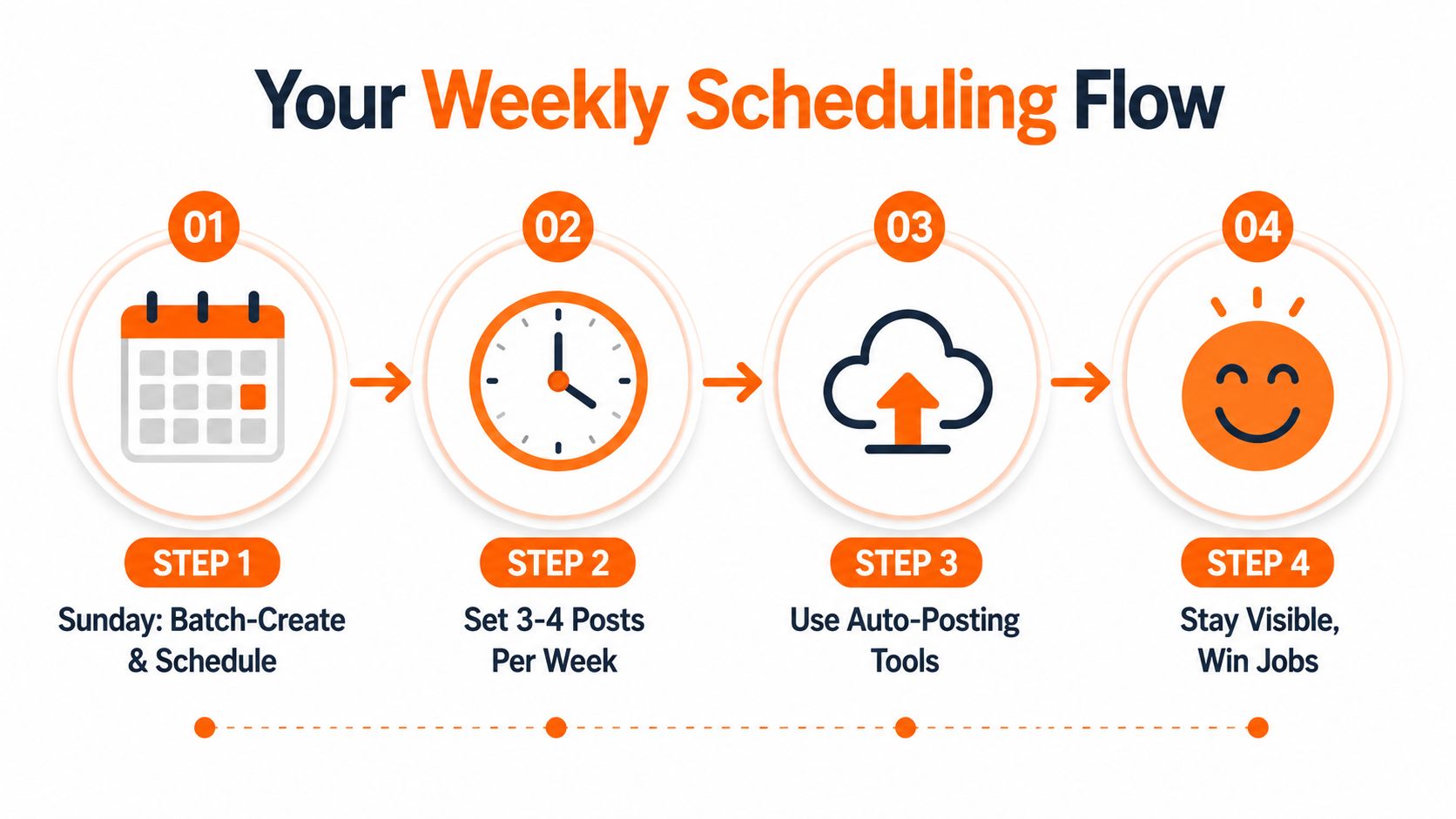
A weekly rhythm works best. Capture photos and short clips on-site, sort them later, write the captions in one sitting, then queue them ahead of time. If you want a cleaner workflow, start with content batching, then build your posting process around it. The University of California, San Diego's social media best practices recommend building a 2-4 week content calendar, batching assets in a single weekly production block, and scheduling posts using platform analytics to pick the highest-activity days and hours (UC San Diego social media best practices).
Set the work up once, then let it run
That setup takes the pressure off. Instead of trying to post in the middle of a job, you use one short block to get the week organised. If you want software built for trade businesses, GrowTradie is one option that connects Facebook, Instagram, Google My Business pages, and LinkedIn so posts can be scheduled from one dashboard.
Practical rule: batch the thinking when you have time, then let the publishing happen while you are on-site.
The aim is not to post more for the sake of it. It is to stop the common pattern of going quiet for two weeks, then firing off three posts in one day when you finally remember. Consistent scheduling keeps your profile active even when your diary is full.
Use analytics instead of guesswork
There is always a temptation to copy generic “best time to post” advice from the internet. That usually wastes more time than it saves. The Surrey guide says to check native insights first, then test posting windows and track early engagement velocity, while keeping posts visually strong and platform-native (University of Surrey social media best practices).
If your audience is most active in the evening, schedule for that. If your audience responds faster to morning posts, use that. The schedule should follow the people you want to reach, not a random chart someone made for everyone and nobody in particular.
Local Targeting and Measuring Results That Lead to Jobs
A post that never reaches people nearby does not help a trade business for long. The value comes from showing local homeowners and property managers the work you already do in their area, so your posts feel relevant to the people most likely to call.
Use suburb names where they fit naturally, and keep the location clear in the caption. Add location tags, post from the job area when it makes sense, and share into local groups only if the post suits that audience. The point is to keep the job tied to the places you service, instead of sending it out to a wide audience that will never become a quote.
Track outcomes that matter to the diary
Likes feel good, but they do not tell you whether the post brought work. Profile visits, message enquiries, click-to-call actions, and quote requests are the signals that matter because they sit closer to an actual booking. Track the posts that lead to those actions, and treat everything else as background noise.
Worcester's analytics guide points to the same basic approach, measure reach, engagement, clicks, and conversions instead of judging a post by likes alone. For a trade business, that means looking at whether a post made someone tap through, call, or send a message, not whether it got a few quick reactions.
Hootsuite's social content guidance also says to fact-check content before sharing it and always link to the original source and tag the source's social accounts when sharing content (Hootsuite social content guidance). That matters if you post advice, tips, or shared material, because trust is built one post at a time, and sloppy sourcing makes a small business look careless.
Review once a month and adjust
A monthly review is enough for most trade businesses. Look at which posts brought enquiries, which ones earned profile clicks, and which jobs got the strongest local response. Then do more of the posts that led to calls, and cut back on the ones that filled the feed without bringing in work.
The Canadian Chamber of Commerce resource notes that engagement can drop when businesses post more than twice per day or less than once per week (Canadian Chamber of Commerce social frequency resource). The lesson is steady posting, not constant posting. Stay visible enough that local customers remember your name when they need the job done.
If you want a simpler way to keep posting without losing time on the tools, GrowTradie handles trade-focused content creation and auto-posting in one place. It keeps your pages active between jobs, so you can stay visible, look consistent, and turn more local attention into actual enquiries.