

You're probably staring at a half-built Facebook page right now, or thinking about starting one because the phone's been too quiet. Maybe the logo's up, maybe the cover photo looks tidy, but there's no clear service area, no real next step, and no reason for a homeowner to trust you over the next bloke in their feed. That's the common mess, and it's why most Facebook business page setup jobs fail before they've even started.
The fix is simple. Stop treating the page like a brochure and build it like a conversion surface, one that makes it easy for locals to understand what you do, where you work, and how to get in touch fast. Meta's own setup and Insights tools show the point clearly, the page is meant to be a discoverable business presence with contact details and measurable engagement, not just a place to dump posts, and Insights can be checked through the Page or Professional Dashboard once it's live (Coursera's breakdown of Meta's page setup flow, Meta's Page Insights help).
If you already have a half-finished page, don't bin it. Fix the basics, tighten the wording, make the contact path obvious, and use the page for what it should do, win enquiries from people who are ready to book.
Table of Contents
- Why Most Tradies Set Up Their Facebook Page Backwards
- What You Need Before You Start and Picking the Right Page Type
- Building the Page Details That Win Local Work
- Photos, Services and the Calls to Action That Bring In Enquiries
- Roles, Privacy, Messaging and Auto-Replies That Build Trust Fast
- First Posts and a Posting Cadence Tradies Can Actually Stick To
- Verification, Reviews and a Simple Monthly Check-In
Why Most Tradies Set Up Their Facebook Page Backwards
The biggest mistake is dead simple. A lot of tradies build the page around what looks complete, then wonder why it doesn't bring in work. A neat logo, a cover image, and a few posts are fine, but they don't matter much if a homeowner can't instantly work out what you do, where you work, and how to contact you.
Treat the page like a local listing, not a gallery
Meta's setup guidance makes the job plain enough. A Page should carry the core business details, including page name, category, description, website, phone number, email, business hours, and location, before you publish and invite people to like and follow it (Coursera's summary of Meta's setup guidance). That's not branding fluff, that's the skeleton of a page that can be found and used.
The right mindset is this. Your page is a contactable local business listing first, and a social presence second. If it doesn't help someone decide quickly that you're the right operator for their job, the design doesn't matter.
Practical rule: if a stranger can't work out your trade and service area in a few seconds, your page is costing you enquiries.
That shift changes everything that comes next. Instead of asking, “Does this look professional?”, ask, “Does this reduce friction for the next person who wants a quote?” That means clear contact details, honest service areas, and language that sounds like a real business, not a polished but empty profile.
Why completeness without conversion fails
Meta's own help materials show that once the page is live, Page Insights can be used to measure performance through the Insights area or Professional Dashboard (Coursera's breakdown). That matters because it lets you compare whether the page is getting attention and interaction after launch, instead of guessing based on likes or how tidy it looks.
The page should be built for booked enquiries, not applause. If you set it up like a marketing trophy, you'll get a nice-looking page and no phone calls. If you set it up like a local service desk, you give people a clear path to call, message, or request a quote.
What You Need Before You Start and Picking the Right Page Type
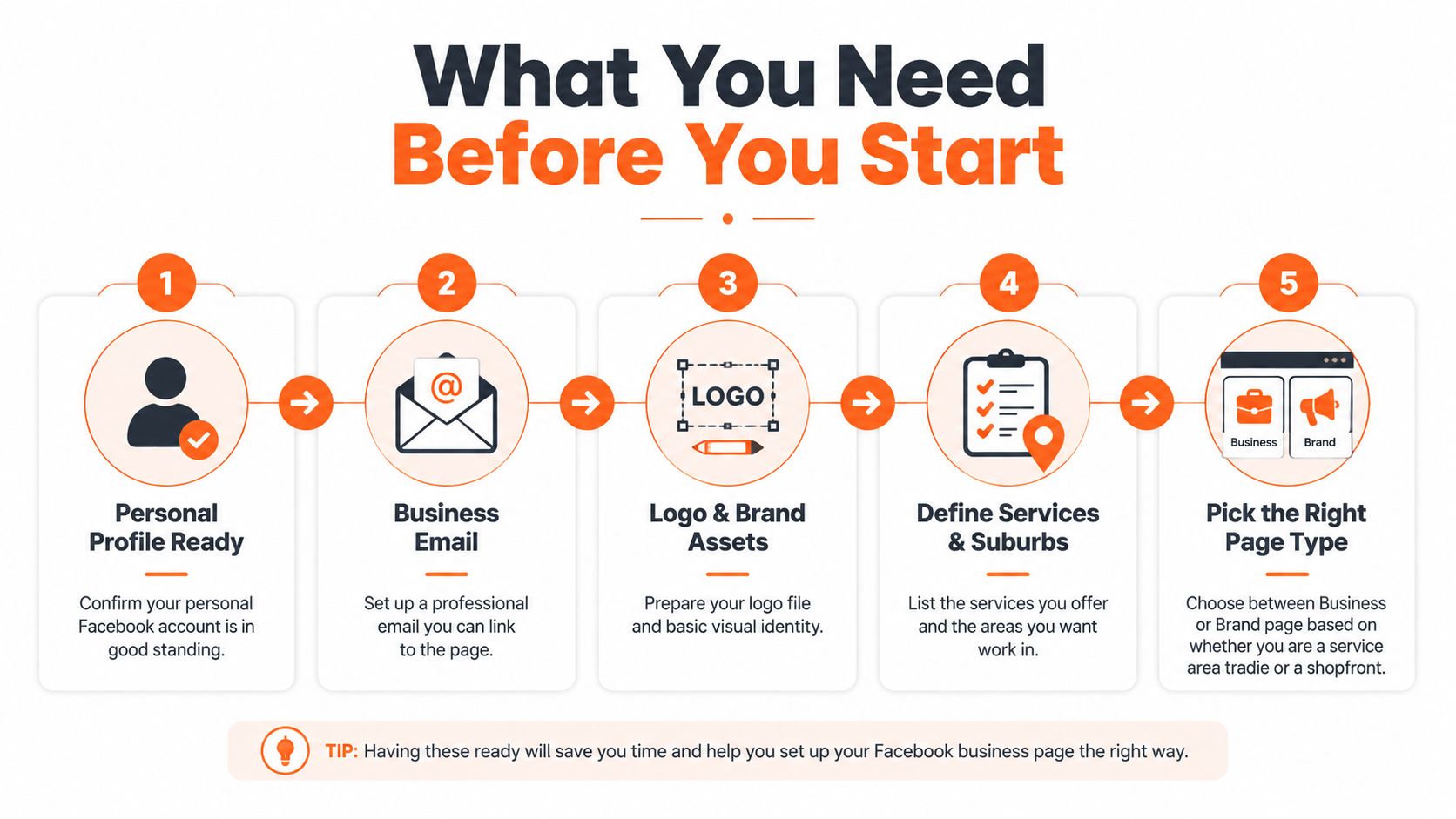
Start with the account side, not the visuals. Meta requires a personal Facebook profile to create and manage a Page, so if your personal account is a mess, locked down in a way that stops admin access, or tied to the wrong person in the business, sort that first (Meta's get-started page). You also need a business email, a decent logo file, and a clear list of the services and suburbs you want jobs in.
Choose the page type that matches how you get work
The right setup depends on whether you're a service-area tradie or a shopfront business. If customers come to you, or you go to them, the page needs to behave like a service business. If they visit you, the page can lean more toward a location-based business presence. Meta's own setup flow asks for a Page name, category, and short description, then recommends adding core business details such as address, service area, hours, email, phone number, website, services, and media so the page is useful from launch (Meta's Page get-started guide).
Pick the page name carefully. Use the name people would naturally search for, and if your trade is broad, keep the name clean instead of cramming it with every keyword under the sun. A page name that's easy to remember is easier to recommend, easier to tag, and easier to reuse on signs, invoices, and job cards.
Keep naming practical for franchises and multi-location setups
If you run more than one location, name the page so the location is obvious without making it unreadable. Franchise owners should keep the parent brand visible, then separate local branches with simple location cues. Don't get clever with nicknames, because customers don't search for clever, they search for the trade and the area.
The short description should be brief and plain. Meta recommends keeping the bio to 1–2 sentences and adding address, areas serviced, email, phone number, website, hours, and services so people can contact and evaluate the business quickly (Meta's Page help). That's the right standard. Short, clear, and useful beats vague and brand-heavy every time.
Building the Page Details That Win Local Work
The details section is where a Facebook page starts earning its keep. Meta's setup flow asks for a Page name, category, and short description, then recommends core business details so the page is usable at launch (Meta's get-started guide). For tradies, every field should answer three questions fast, what do you do, where do you work, and how does a customer reach you.
Fill the About section like a working business
Your category should match the main trade first, then a relevant secondary if it helps. Leave out the extra categories that only make the page harder to read. The point is simple, the category should help people and the platform understand the business quickly when someone is searching under pressure.
The bio should be tight. Meta recommends 1–2 sentences for the short bio, so use it to say exactly what you do and who you serve (Meta's Page help). In the longer description, mention your services and suburbs in plain language. Say the work you take on, not every job you have ever touched once.
Put contact details where people expect them
Fill in service area, business hours, phone number, email, and website. Leave fields blank only if you cannot support them, because missing contact details make people pause. Meta recommends adding address, areas serviced, email, phone number, website, hours and services so visitors can judge the business quickly (Meta's Page help).
Add a profile picture and cover photo as part of the setup, but keep them in support of the contact path (Meta's Page help). The photos should confirm the business is real while keeping the focus on the contact path.
Screenshot this checklist
- Profile picture: use a clear logo or brand mark.
- Cover image: show the trade, not a generic stock scene.
- Bio: keep it to 1–2 sentences.
- Service area: list the suburbs you actually work in.
- Contact details: include phone, email, website, and hours.
- Services: name the work the way customers ask for it.
Use real job photos that show clean finishes, active work, and a business people can trust. this practical photo guide gives a good steer on the kind of images that support that job without turning the page into a gallery.
Photos, Services and the Calls to Action That Bring In Enquiries
Photos aren't decoration on a Facebook page. They're proof. A homeowner wants to see real job shots, clean finishes, team photos on site, and a branded van if you've got one, because those details tell them you're active, legitimate, and local. That's especially true when they're comparing you with three other pages that all look vaguely the same.
Make the Services section read like a customer search
The Services section should sound like the way people ask for the work. Don't write jargon if customers don't use it. If you're a plumber, list the kinds of jobs people ring about. If you're an electrician, break it down in plain language. The point is to make the page feel immediately relevant, not to impress other tradies.
Your page should also make the next action obvious. Meta's setup guidance includes adding a page name, category, description, website, phone number, email, business hours and location before publishing and inviting people to like and follow it (Coursera's overview). That's the full contact path, and the page should keep all of it easy to find.
Choose one main action and back it up
Pick a CTA button that matches how the work comes in. Call suits urgent jobs and service calls. Message works if your team replies fast. Get Quote is a strong choice when customers want a quick written step before booking. Book Now only makes sense if you can handle bookings properly.
Pin the most useful post to the top, usually a service summary, a recent job, or a clear offer. Keep the important tabs visible and don't clutter the page with junk no one will use. The goal is simple, make the next step obvious before the visitor starts scrolling.
A tidy page with weak proof loses to a rougher page with strong, real job photos every time.
Roles, Privacy, Messaging and Auto-Replies That Build Trust Fast
Admin settings are boring right up until they cost you a job. If the wrong person has access, enquiries get missed, replies drag, and the customer goes elsewhere. Keep access tight, give the office person the controls they need, and don't hand out full control to every subcontractor who asks.
Set roles so the page runs without drama
Page roles should match the way the work gets handled. The person answering enquiries needs message access and enough permission to update hours, photos, and contact details. A subcontractor might only need limited access if they're posting job photos or handling the odd comment.
Privacy is simpler than people make it. A Page isn't the same as a personal profile, so you're not dealing with the same privacy settings. What matters is notification control, message handling, and making sure the page owner isn't the only person who knows how to log in.
Meta's business guidance keeps pushing Messenger saved replies, autoresponders, response-time expectations, category selection, and business details such as service area, business hours and phone number, which tells you where the platform is headed, inquiry handling, not just brand presence.
Use replies to set expectations before the first conversation
Turn on instant replies and away messages if you can't answer straight away. Saved replies are worth using for the usual questions, service area, availability, and how to request a quote. Customers don't want a perfect paragraph, they want to know you're alive and you'll get back to them.
Direct advice: a fast, average reply beats a polished, late reply.
Response speed is part of the trust layer. If a homeowner messages and hears nothing, they'll assume you're flat out, disorganised, or both. That's why the page should be built around speed-to-response, not vanity settings.
If you want a tighter workflow for turning enquiry notes into replies and posts, this posting guide helps keep it practical without making social media another admin headache.
First Posts and a Posting Cadence Tradies Can Actually Stick To
The first posts should prove you do the work, not try to entertain strangers. Start with a job completion shot, a quick before-and-after, a short explainer about a common issue, a customer thank-you, and a seasonal reminder. Those five post types give you enough variety without turning content into another job you hate.
Keep the cadence realistic
Solo operators should keep it simple and repeatable. Small crews can post a bit more often because there's more happening on site, more photos coming in, and more chances to show the day-to-day rhythm of the business. The goal is consistency, not volume for the sake of volume.
Write like a human. Say what the job was, what problem you fixed, and where the work happened if it makes sense to mention the area. Don't write like a brand trying to sound important. Customers trust plain language because it sounds like the bloke who turned up.
If writing content is the bit you hate, use a workflow that fits a trade schedule. This posting guide is useful for turning on-the-job notes into posts without sitting down for an hour and staring at a blank screen.
Boost only the posts worth showing more widely
Don't boost every post. Boost the strong ones, the posts that already show real work, real proof, and a clear local angle. A boosted job photo can be useful for local awareness, but only if the post itself is good enough to stand on its own.
Keep the targeting simple. Use a local radius, the relevant age band for homeowners, and one practical interest layer if it fits. Don't overcomplicate it with a pile of settings you won't review later. Boosting is there to put a good post in front of nearby people, not to replace a proper ad strategy.
Simple rule: if the post wouldn't impress a potential customer organically, don't pay to push it.
For tradies who want a more automated rhythm, this posting system is a useful model for staying visible between jobs without living on the app.
Verification, Reviews and a Simple Monthly Check-In
A page isn't finished when it goes live. It needs a regular check so the details stay current and the signals stay strong. That means confirming the page still reflects the business, keeping the hours right, and making sure the reviews and visuals don't look abandoned.
Ask for reviews without being awkward
Reviews work best when they're tied to the end of a good job. Ask when the customer is happy, keep the request short, and make it easy for them to act. Don't chase everyone, and don't sound desperate. A calm, matter-of-fact ask feels normal and professional.
If a negative review lands, respond like a business that's still in business. Acknowledge the issue, keep the tone steady, and offer to sort it offline. The worst move is silence, because it makes the criticism look right.
For a cleaner reputation process, this reputation guide is worth a look alongside your page setup.
Check Insights once a month and adjust what matters
Meta's Page Insights uses 7, 14, or 28 day windows and breaks results into views, engagement, net followers, 3-second video views, and 1-minute video views (Meta's Page Insights help). For a tradie, the numbers to care about are the ones that tell you whether people are seeing the page, interacting with it, and following along after the first visit.
Use the monthly check-in for the basics. Update hours if they've changed, refresh the cover or profile photo if the branding has drifted, and remove any pinned post that's gone stale. Keep the page looking active without turning it into a chore.
Monthly check list
- Review Insights: look at views, engagement, and net followers.
- Check contact details: phone, hours, email, and service area.
- Refresh proof: add new job photos and swap out stale images.
- Clean the top of the page: keep the pinned post relevant.
- Read messages: make sure no enquiry has been left hanging.
The set-and-forget mindset is lazy and expensive. A page that stays current, replies fast, and shows real work is far more likely to turn a local browse into a booked job.
If you want the easy way to keep your page active without babysitting it, GrowTradie builds trade-focused posts, keeps them moving, and helps your business stay visible between jobs, calls, and site visits. It's built for tradies who want steady local attention and more enquiries without wasting evenings on content.